


Other links
Radia - General Discussions

Silverlight 5.1.41212.0 breaks WUA on Windows 10 / Windows 10 WUA troubleshooting
I recently worked on a case where the WUA agent was not working on newly imaged Windows 10 systems after patch Tuesday February 2019.
It was determined that an old version of Silverlight was the root cause of the problem and the resolution was to install a newer version of Silverlight
Problem:
Silverlight 5.1.41212.0 breaks the WUA agent on newly imaged Windows 10 systems after patch Tuesday February 2019.
Resolution:
Installing Silverlight 5.1.50915.0 resolves the issue.
NOTE: If manually updating Silverlight to 5.1.50915 resolves the problem and you want to automate the Silverlight update via Radia Patch Manager open a case requesting the custom XML file MSC-KB4023307. This is currently available for Win7, Win8.1, and Win10 systems. if you require additional OS's please add the OS's to the case when opening the request.
Error in the patch connect log:
20190218 09:59:46 Info: Current version of WUA is 10.0.14393.2097
20190218 09:59:46 Info: Current version of MSI is 5.0.14393.0
20190218 09:59:46 Info: WUA Scan file is C:\PROGRA~2\PSL\RCA\Agent\Lib\WUA\wsusscn2.cab
20190218 09:59:46 Info: WUA Catalog Size : 537695760 bytes & Date/Time : Tue Feb 12 2:42:16 AM Eastern Standard Time 2019
20190218 09:59:58 Info: Registering Service 99b5bd9a-87e0-4cc6-9887-715a7e903cec
20190218 10:07:11 Error: The system cannot find the file specified.
while executing
"com::Invoke $updateSearcher Search [list VT_BSTR Type='Software']"
20190218 10:07:11 Error: Error in WUA scan : The system cannot find the file specified.
20190218 10:07:11 Error: WUA Scan failed with The system cannot find the file specified., please ensure c:\Windows\SoftwareDistribution is being excluded from virus scans
20190218 10:07:11 Error: No scan result found
while executing
"error "No scan result found""
(procedure "run_scan" line 139)
invoked from within
"run_scan"
(procedure "load_scan_results" line 21)
invoked from within
"load_scan_results"
20190218 10:07:11 Error: Error in WUA scan : No scan result found
Troubleshooting WUA on Windows 10:
Run Powershell offline scan to check WUA (Scan-UpdatesOffline.ps1)
https://gallery.technet.microsoft.com/Using-WUA-to-Scan-for-f7e5e0be
Copy the wsusscn2.cab file into c:/temp or change the .ps1 path to wsusscn2.cab,
If successful the output should look like this:
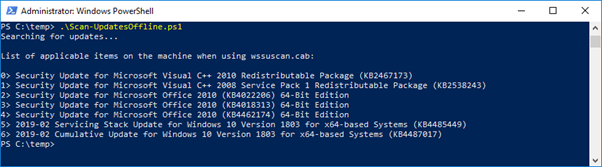
Run PowerShell to convert WindowsUpdate data to readable format
Get-WindowsUpdateLog
Output is sent to the desktop and should look like the following:
2019/02/23 07:05:54.1338811 11096 132176 Agent Added update 79E70BC9-237E-4486-9AC8-DD8A85880A4E.200 to search result
2019/02/23 07:05:54.1339173 11096 132176 Agent Found 7 updates and 97 categories in search; evaluated appl. rules of 1732 out of 2703 deployed entities
The following shows the WindowsUpdateLog output of a corrupt WUA agent
1600/12/31 19:00:00.0000000 704 1356 Unknown( 14): GUID=fa8efdd1-a34b-3ee9-325f-d42a4a03e8df (No Format Information found).
1600/12/31 19:00:00.0000000 704 1356 Unknown( 15): GUID=fa8efdd1-a34b-3ee9-325f-d42a4a03e8df (No Format Information found).
1600/12/31 19:00:00.0000000 704 1356 Unknown( 16): GUID=fa8efdd1-a34b-3ee9-325f-d42a4a03e8df (No Format Information found).
Previous 0 comentários
Participate
Ask, Discuss, Answer